
Microsoft Teams Direct Routing
Teams Direct Routing with the built-in SBC
The EasyUC Session Border Controller connects Microsoft Teams to the ACD. It is part of the appliance and runs in your data centre. You can connect Cisco CUCM in the same installation.
One SBC for multiple Teams tenants
The SBC is included in the EasyUC appliance. It handles the SIP connection to Microsoft Teams and encrypted media traffic. Manage it in EasyUC alongside the associated tenants.
The SBC is multi-tenant. Each Teams tenant gets its own SIP profile, so several companies with separate tenants can make calls through a single installation.
TLS, certificates checked on both sides, and SRTP
Signalling to Microsoft uses TLS 1.2 on port 5061. The SBC validates the other side's certificate against Microsoft's root CAs, and Microsoft validates the SBC's certificate.
Audio is always encrypted with SRTP and always runs through the SBC. Media bypass is not used. You therefore open one fixed RTP port range on the firewall, and every call can be followed in the SIP trace.
| Signalling | SIP over TLS 1.2, 5061/TCP |
|---|---|
| Authentication | mutual TLS against Microsoft's root CAs |
| Media | SRTP, mandatory |
| Crypto suite | AES_CM_128_HMAC_SHA1_80 |
| RTP port range | 20000–20999/UDP |
| Media path | always through the SBC |
| Tenants | one SIP profile per Teams tenant |
| Based on | FreeSWITCH |
Manage SBC certificates
The SBC certificate has to come from a public certificate authority. EasyUC obtains it from Let's Encrypt using the DNS-01 challenge, so the SBC does not need to be reachable over HTTP from the internet.
- 1
Choose a DNS name
For example
sbc01.muster-netz.de, in a domain registered in your Microsoft 365 tenant. - 2
Answer the challenge
EasyUC displays the required TXT record. Add it at your DNS provider or use the configured DNS automation.
- 3
Issue the certificate
Let's Encrypt checks the record and issues the certificate. EasyUC installs it on the SBC.
- 4
Renew
EasyUC can renew the certificate when DNS validation is automated. Manual TXT validation requires a new DNS record. Check the expiry date and status.
Configure trunks and voice routes from EasyUC
After Teams administrator sign-in, EasyUC can configure the PSTN gateway, voice routes and voice routing policy through PowerShell. Check the selected tenant and planned changes before running the operation.
The Teams handbook explains sign-in, preview and confirmation.
The Teams number plan shows all numbers of the tenant with owner and EasyUC target. Every Teams call has a call history with a SIP ladder diagram; you set the retention per tenant between 1 and 365 days.
Log of the automated tenant setup, shortened. Demo data.
ACD features for Teams
Teams calls routed through EasyUC can use IVR scripts, queues and skills. Set up Teams users as agents or attendants and show their presence in the busy lamp field.
Assign the user, phone number and device in the administration interface.
- IVR scripts with text announcements and menus
- Queues and skills
- Attendant console on the Teams client or a Teams phone
- Teams presence in the busy lamp field
- Call reports for Teams and CUCM calls
- Attendant console as a private app in Microsoft Teams
- Scripts reachable through Teams only, without a CUCM number
CUCM and Teams side by side, or Teams on its own
Many organisations move over step by step. Some staff are still on Cisco phones, others already use Teams. EasyUC serves both from one installation.
Side by side
CUCM over JTAPI and Teams through the SBC in one installation. Agents and attendant consoles can be on either side.
Without CUCM
The ACD works with the SBC and Microsoft Teams alone. No CUCM required.
Cisco only
The ACD works with CUCM only. The SBC can be added later.
Presence sync
A call on the Cisco phone sets the Teams user to “In a call”. The module also runs without SBC and ACD.
What you need for Direct Routing
We go through these points with you before the installation. Most of them are Microsoft requirements and apply to any SBC.
Public DNS name
An FQDN for the SBC, for example
sbc01.muster-netz.de, in a domain registered in your Microsoft 365 tenant.Reachability
The SBC must be reachable from the internet under that name.
Certificate
A certificate from a public CA for that name. EasyUC gets it from Let's Encrypt; you need access to the DNS zone or a Cloudflare account.
Firewall: signalling
5061/TCPbetween the SBC and Microsoft's SIP signalling addresses, in both directions.Firewall: media
20000–20999/UDPon the SBC and Microsoft's media port ranges.Teams Phone licences
Every Teams user who calls through Direct Routing needs a Teams Phone licence, for example Teams Phone Standard or an E5 licence.
Tenant administrator
An account with the rights to create the PSTN gateway, voice routes and voice routing policy in the tenant.
Microsoft changes its IP ranges and ports from time to time. During setup we check them against Microsoft's current Direct Routing documentation.
Plan your Teams telephony with EasyUC
Tell us how many tenants you manage, which numbers you plan to use and which ACD features you need. We will discuss the SBC, certificates and connection to your existing telephony.
Existing customers
Licences, updates, invoices and support tickets are in the customer portal.
Go to the customer portalInside EasyUC
Microsoft Teams with EasyUC
See the Teams integration in the EasyUC interface.
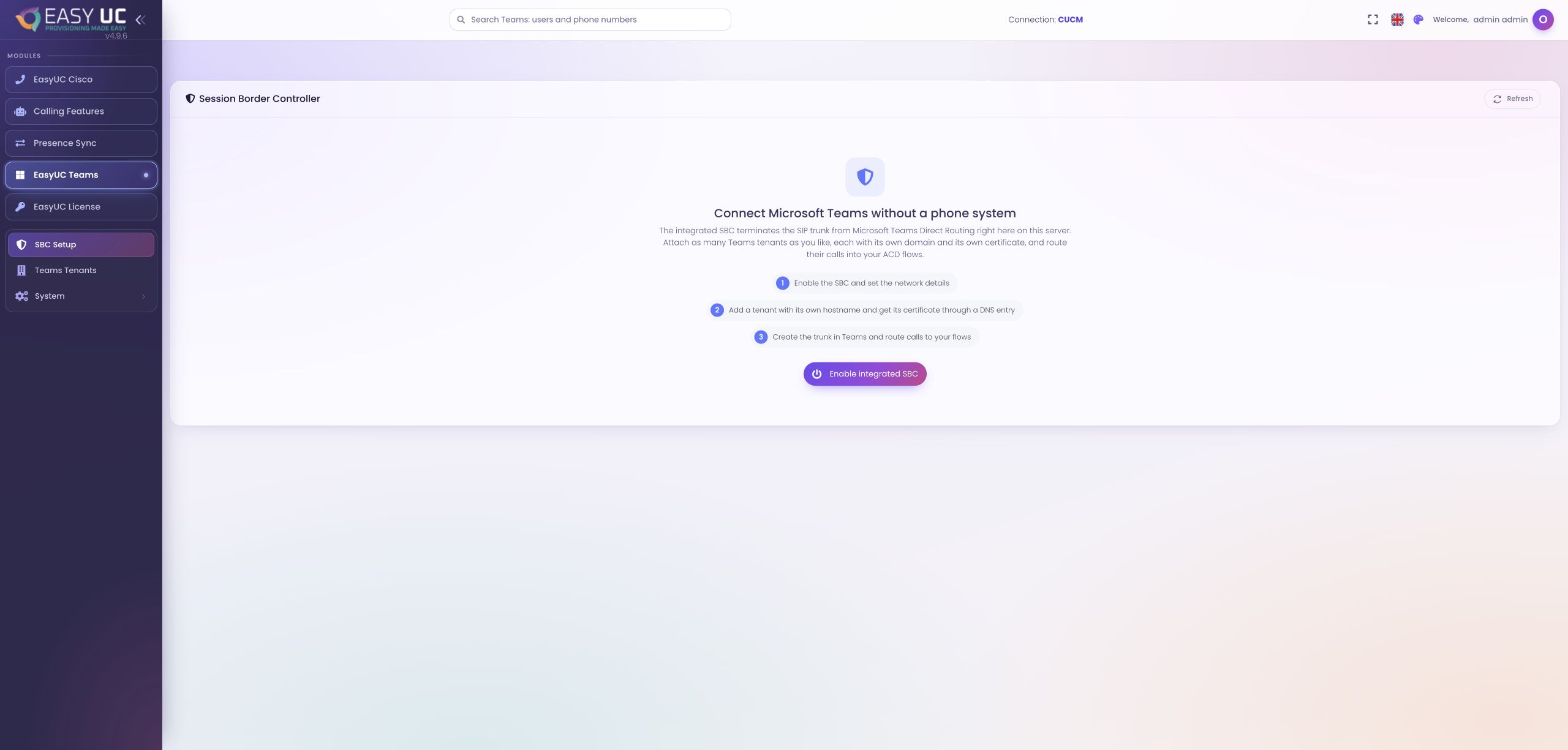
Set up Microsoft Teams
The integrated SBC setup screen for Microsoft Teams Direct Routing. This capture shows the lab environment before activation.
These captures show the actual EasyUC interface in a lab/demo environment. Open an image to see it in more detail. Parts of the lab interface are not yet fully translated. When a matching language version is unavailable, the different screenshot language is labelled.
Features in practice
Connect Microsoft Teams to telephony
The integrated SBC setup takes you from network settings through tenant configuration to a Direct Routing connection.
Set up the integrated SBC Manage the connection between Microsoft Teams Direct Routing and EasyUC in one place.
The integrated Session Border Controller terminates the Microsoft Teams Direct Routing SIP trunk on the EasyUC server. Base settings apply to the SBC as a whole, while each tenant has its own hostname and certificate. This lets you assign different tenants to their own domains.
The actual screenshot shows the entry screen before activation. Setup covers network details, a tenant with its hostname and certificate, and the Microsoft Teams trunk. Once configured, the SBC view shows service status and connected tenants.
How to use this feature
- Open SBC setup
Open the SBC page under Microsoft Teams and start setting up the integrated SBC.
- Enter network settings
Enter the public IP, local media IP and intended TLS and RTP ports. Complete the certificate-request settings.
- Add a tenant and certificate
Add a Teams tenant with its hostname. Follow the tenant page’s instructions for DNS validation and the certificate request.
- Configure the trunk and routing
Set up the Direct Routing connection in Microsoft Teams and map incoming calls to the intended flows. Then check the service and trunk status.
How does this become a working process? Our use cases show each step directly in the EasyUC interface.
Explore practical examples